| Way | Who | What you get | The catch |
|---|---|---|---|
| Copy and paste | Everyone | The comments you expanded, as plain text. | Who replied to whom, scores and times are lost. Collapsed replies stay hidden. |
| Request your data from Reddit | Your own account | A copy of your own account data, from your Reddit settings. | Only your own activity: not the other comments in a thread, not a subreddit. |
| .json at the end of the address | Developers | The page's data as JSON, which a script can turn into CSV. | One page at a time: "load more" comments stay unloaded. Reddit may refuse it when it sees too many requests. |
| A script with Reddit's API | Developers | Whatever the script asks for. | Needs API credentials, and Reddit closed most of its free API in 2026. |
| Threadcrate for Reddit | Anyone with Chrome on a computer | A thread with its whole comment tree, a subreddit, a profile or a search, as posts.csv and comments.csv, plus JSON and Markdown. | A browser extension, so not on a phone. Big exports take minutes, at the pace Reddit allows. |
The ways without an extension
Copy and paste
Expand every "more replies" you need, select the thread and paste it into a document. It works for a short thread you want to read later, but a spreadsheet gets one long column of text: no authors, scores or times in their own cells, and no way to tell which comment answers which.
Request your data from Reddit
In your Reddit account settings you can ask Reddit for a copy of the data it has about your account. That's the way to keep your own posts and comments. It doesn't hold other people's comments in the threads you took part in, and it can't export a subreddit.
Add .json to the address
Put .json at the end of a Reddit address and Reddit shows the page's data instead of the page. A script can turn that into CSV. It holds one page of the thread: the collapsed "load more comments" parts aren't in it, and fetching them is up to your script. Reddit may also refuse these requests when there are too many.
A script with Reddit's API
Libraries such as PRAW (Python) read Reddit through its official API. You need API credentials from Reddit, and Reddit closed most of its free API in 2026, so many export tools built on it stopped working.
Export a thread or subreddit with Threadcrate
Threadcrate is a free, open-source browser extension. It reads the same pages reddit.com shows you, in your own browser, so it works logged out and needs no API key.
- Open the thread, subreddit, profile or search on reddit.com.
- Click Threadcrate in the toolbar, or Export next to Share on a post.
- Pick how many posts and comments. Each choice shows how long it takes. Press Export.
- Unzip the file it saves in your Downloads folder and open
posts.csvorcomments.csv.
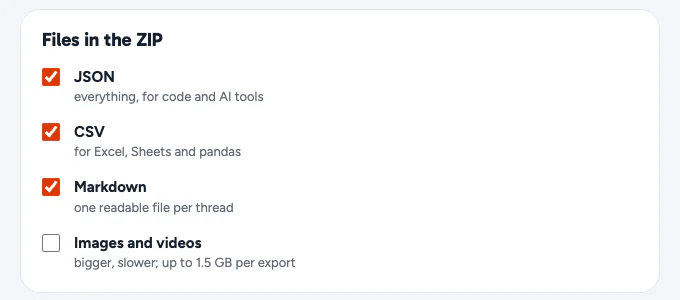
CSV is on by default, next to JSON and Markdown. Images and videos are off until you turn them on in the settings.
What's in posts.csv and comments.csv
posts.csv has one row per post and comments.csv one row per comment. Field names follow Reddit's own, so code written for Reddit's data reads them too.
parent_idis the post (t3_…) for a top-level comment and the comment it answers (t1_…) otherwise.depthis 0 for top-level comments, andpathlists the ids from the top-level comment down, joined by/.created_utcis an ISO 8601 time in UTC, andcreated_unixthe same moment in seconds, for sorting.- Deleted and removed comments stay in as
[deleted]and[removed], withremoval_statussaying which, so their replies keep their place. num_commentsis Reddit's count andcomments_exportedwhat the export holds. Reddit's count includes removed comments it no longer shows anyone, so the two can differ;manifest.jsonlists what couldn't be loaded, and why.
posts.csv columns
idsubredditauthortitleselftexturlpermalinkcreated_utccreated_unixedited_utcscoreupvote_rationum_commentscomments_exportedlink_flair_textauthor_flair_textmedia_typemedia_urlsover_18spoilerlockedstickiedarchivedis_selfdistinguishedremoval_statusdomaincrosspost_parentnamesubreddit_idauthor_fullname
comments.csv columns
idlink_idlink_titleparent_idroot_comment_iddepthpathauthoris_submitterbodyscorecreated_utccreated_unixedited_utcdistinguishedstickiedremoval_statuscontroversialityscore_hiddensubredditpermalinknameauthor_fullname
Open it in Excel or Google Sheets
The files are UTF-8 with a byte-order mark, which Excel needs to show accents and emoji correctly. If a double-click puts everything in one column (Excel in some countries expects semicolons), use Data › From Text/CSV and pick comma. In Google Sheets, use File › Import › Upload. Comments are written by strangers, so any cell that starts with =, +, - or @ gets an apostrophe in front: a spreadsheet never runs a comment as a formula.
Rebuild the thread in pandas
The columns are enough to put the tree back together:
import pandas as pd

comments = pd.read_csv("comments.csv")

# Top-level comments answer the post; the rest answer another comment.
top_level = comments[comments.depth == 0]
replies = comments[comments.depth > 0]

# How many direct replies each comment got.
reply_counts = replies.groupby("parent_id").size()
If you'd rather have the tree already built, data.json in the same ZIP has every comment nested under its parent.
Exporting a whole subreddit
Reddit lists at most about 1,000 posts for any one sort of a subreddit, profile or search. Threadcrate exports up to that from the sort you're looking at. With Find more than the 1,000 posts Reddit lists on in the settings, an All export reads eight lists (newest, top and controversial over several time ranges, and hot) and keeps each post once. That finds several thousand posts in a big subreddit, though never every old one.
Reddit's request limit sets the pace, so comments are the biggest choice. Top comments take one request per post; all comments follow every reply, and a big thread can take hundreds of requests. The popup shows the time for each choice before you start.
Use it responsibly
Export what you have a right to keep: your own posts, threads you take part in, research data you'll handle with care. Respect Reddit's User Agreement and the people who wrote the comments. See the privacy policy for what the extension does with data: nothing leaves your browser except its requests to Reddit.